Setting up Pinchord
Guide for setting up Pinchord.
Note that Pinchord is in Pre-release, meaning that it not stable yet! It is ready for full time use for those interested, so you can still try it out if you'd like :)
Pinchord runs on Plover, an open source steno engine.
Keyboard
Pinchord works on any keyboard with enough keys that can be pressed together comfortably, as long as the board actually registers those key presses.
I would recommend purchasing a dedicated steno keyboard to learn Pinchord, as they are designed for chording comfortably.
If you'd like to try Pinchord on a non-steno board, it has to be comfortable to press keys multiple keys together with the same finger. Try pressing the e and o, the p and ;, and the y, u, h, and j keys at the same time on a QWERTY keyboard. Your board may also only be able to register a few key presses simultaneously, which won't work for Pinchord. You can test how many keys your board can register on a website like https://keyboardchecker.com.
Pressing keys together is uncomfortable on most keyboards, so you'll want a keyboard that places these keys close together. You can also try flipping the top row keycaps of a standard keyboard to bring the keys closer together:
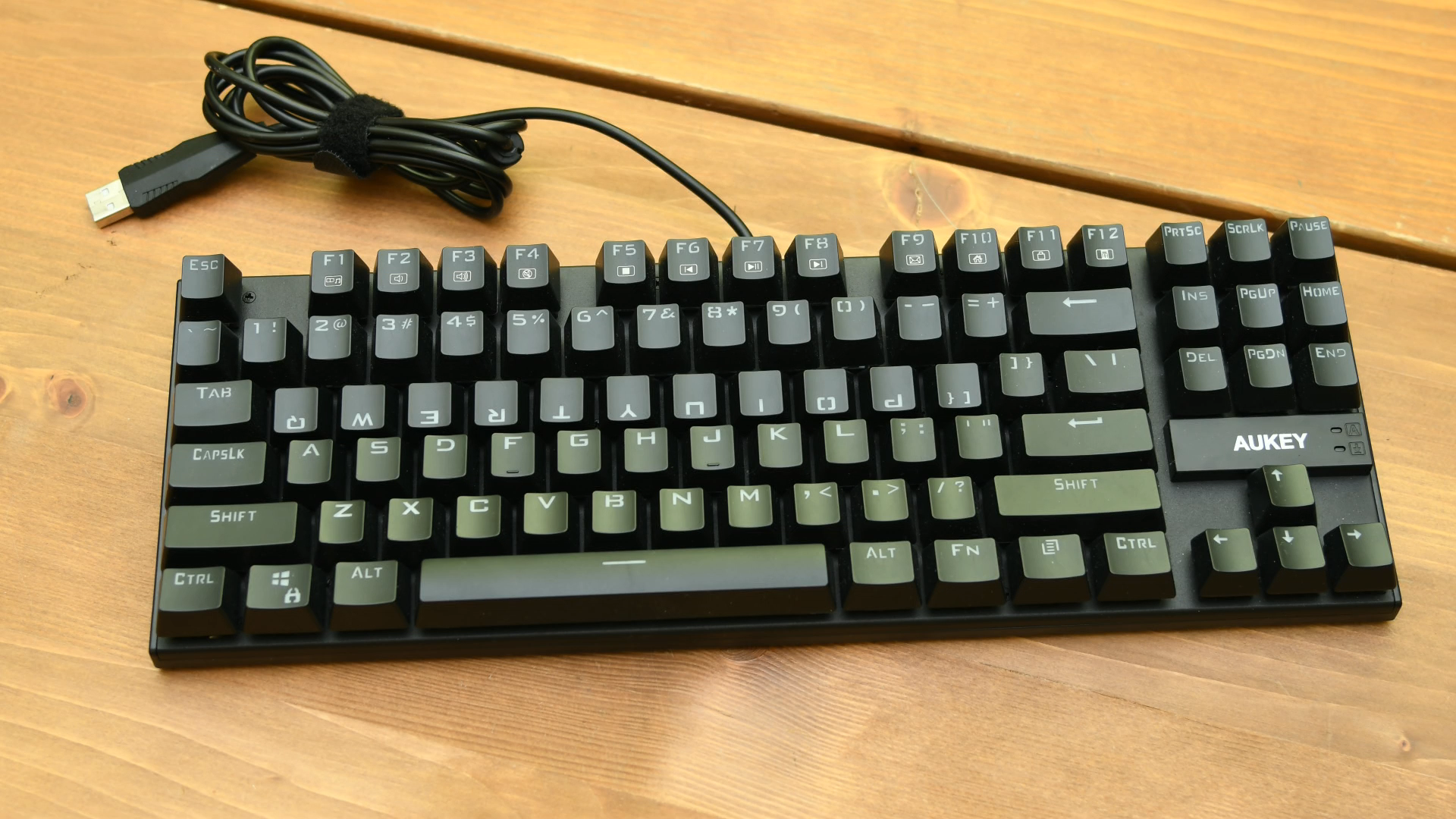
Image Credit: Aerick1
I would only recommend trying Pinchord out to see if you might like it on a board like this, as there is a real risk of injury when not using a board designed for chording!
Using a steno board is always preferred, as they are build for chording comfortably with aligned rows and ultra-light springs.
Setup
- Download and open Plover (https://github.com/opensteno/plover/releases/latest)
- Go to "Plugins Manager" at the top bar thing
- Scroll and find
plover-pinchord - Hit "Install/Update"
- Hit "Close" in the popup, and "Restart"
- In "Configure" > "System", make sure your system is set to "Pinchord" :)
To update the plugin, you'll have to delete the Pinchord system section in your config. Under File > Open config folder, the plover.cfg file will have a [System: Pinchord] section. Delete it before re-installing the plugin.
If you need help setting anything up, you can reach out, or join the Pinchord discord server: https://discord.gg/64eccde3jN
Questions and suggestions always welcome.
Javelin Installation
For the old javelin guides, see Setting up Pinchord on Javelin and Setting up Pinchord on Starboard. Source is at pinchord.git if you'd like to make your own implementation/derivation.
Content on this page licensed under CC BY-SA 4.0 unless otherwise stated
-
Flipped keycap image copyright Aerick licensed under https://github.com/aerickt/lapwing-for-beginners/blob/46b53e1ebec3b19fb402da046d6dc0a13b530787/LICENSE
↩